
Searching Cases by Name
For a Dallas County name search, use Missouri Case.net. The public guide lets you search by last name. You can add a first or middle name where shown. You can also pick from a participating-court list. Choose the Dallas County or 30th Judicial Circuit scope when the option appears. Before opening a record, check any name match carefully. Compare it against the case number, court, filing date, case type, party role, and status.
A common last name can pull up many Dallas County or statewide hits. Former names and initials can change the list too. So can spelling variants, business names, and municipal divisions. If a result's court and event history do not line up, do not treat it as the right Dallas County case.
- Open Case.net and select the litigant-name route.
- Enter the last name and add first or middle name information if the result set is too broad.
- Select the Dallas County or participating-court scope displayed for the search.
- Compare the case header fields, then open only the row that matches the known court, date, role, and case type.
| Dallas County name-search field | Type | Needed | Use |
|---|---|---|---|
| Last Name | Text | Useful starting field | Begin broadly, then check each Dallas County result. |
| First or Middle Name | Text | Optional | Use to narrow a common name. |
| Participating Court | Selector | Scope check | Confirm the Dallas County or relevant court setting. |
| Case fields on results | Displayed data | Verification step | Compare number, style, court, date, type, status, and role. |
Dallas County Case Search Modes
Case.net gives Dallas County searchers more than a name box. The official system covers litigant name and filing date. It also covers case number or OCN, scheduled hearings and trials, and a judgment index. Pick the mode that fits what you already know. A case number is the most precise route. A filing-date search suits a short time window, while the hearing search targets future settings.
Dallas County search check: A blank result means the matter was not found in that search scope. It does not prove there is no Dallas County case because court selection, spelling, archive material, restrictions, or municipal participation can change the result.
Searching by Case Number
Searching by case number in Dallas County takes two steps. Open the Case.net court selector, then use the Case Number or OCN field. Copy the identifier exactly as it appears on a notice, docket, or prior court paper. The official guide lists Case Number and "or OCN" as separate entries. Exact formatting can matter.
A municipal uniform citation can also work as a case number. A nine-digit citation number can be used in that setting. A citation can run longer than nine digits. Then check with the clerk or the OSCA help desk rather than trimming or guessing. Never enter a Social Security number into a public search.
One example of the identifier format is 123456789. That is an illustrative nine-digit format only, not a Dallas County sample case number.
Dallas County Case Search Court Scope
The participating-court selector matters in a Dallas County case search. The public guide offers an All Participating Courts option. But confirm the 30th Judicial Circuit or the municipal division you need is actually included before trusting the results. A municipal division can have its own participation status. Even so, Missouri law treats it as a circuit-court division.
When a Dallas County municipal matter fails to appear, call the Circuit Clerk at (417) 345-2243 for routing and participation details. The clerk can also explain public-terminal access at the courthouse. Dallas County offers no separate official docket portal. Case.net stands as the statewide public starting point rather than a local database.
What a Case Search Returns
A Dallas County Case.net result can show the case number, style, parties and attorneys, filing date, court, case type, and status. Open the record and you may find chronological docket entries, hearing settings, links to public filings, service activity, charges or civil-judgment fields, and disposition details. What appears depends on the case type, your role, and the access rule in play.
| Case number | The Dallas County identifier used to return to the same docket or request a copy. |
|---|---|
| Style and parties | Case caption and party roles, subject to public-record and privacy limits. |
| Court and case type | Dallas County court, division or category, and the type of matter shown. |
| Filed date and status | When the case was filed and a displayed status such as pending or disposed. |
| Docket events and settings | Chronological entries, hearing details, and outcome fields where public. |
Remember, a docket is an index. It does not automatically show the whole Dallas County case file. A public event can appear even when the underlying document is restricted, courthouse-only, or unavailable through remote viewing.
Dallas County Case Search by Filing Date
The Case.net filing-date search asks for a court selector, a start date or date range, and the case-status options shown on screen. For Dallas County, start narrow with a single week or month. Wide ranges tend to produce long lists that take extra sorting before you pin down the right case.
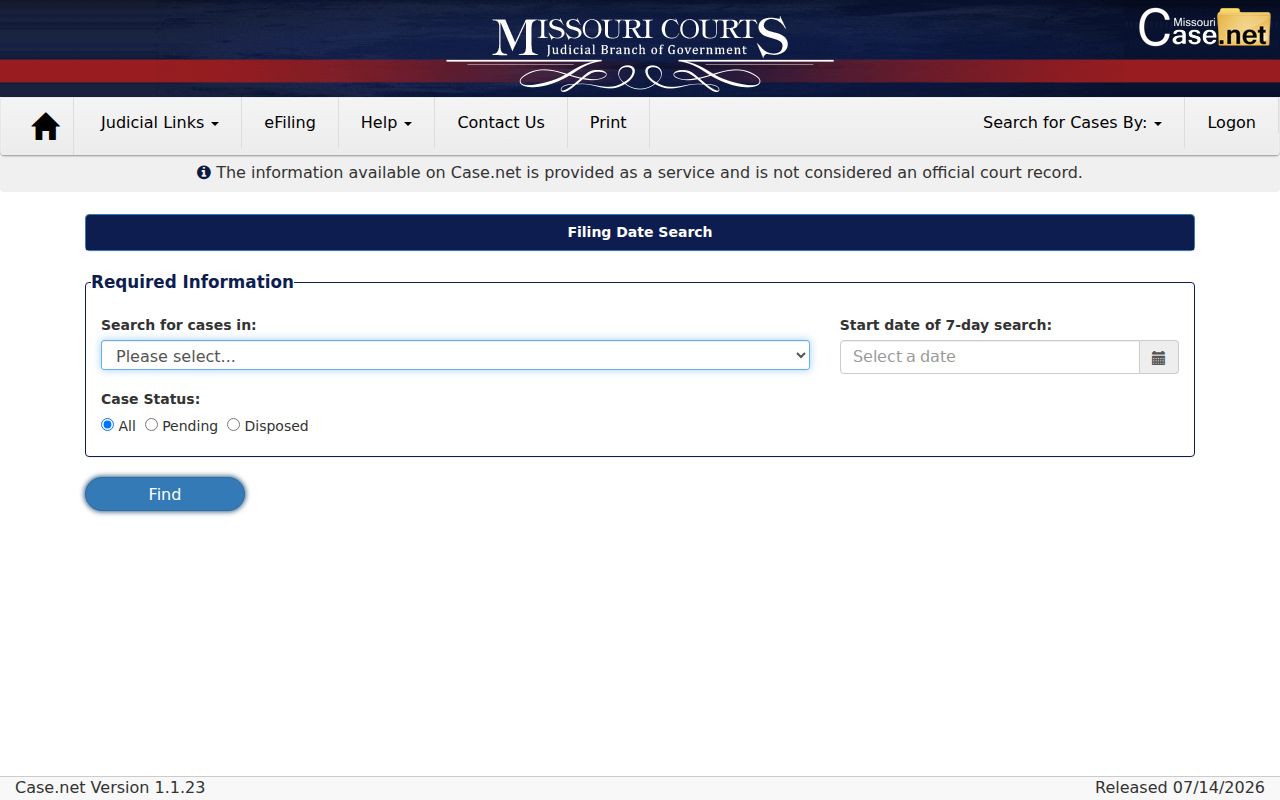
The official filing-date screen is a good reminder to set the court and status controls before assuming a result belongs to the Dallas County docket you need.
Note: a filing date only tells you when a Dallas County case entered the system. It does not identify a hearing date or an outcome.
Dallas County Case Search File Viewer
Case.net search results and public documents are two different layers of access. The official Case.net file-viewer help explains that public documents can be linked from docket entries. Availability still depends on document status and role. Courthouse staff can log a public user into the file viewer. Attorneys get role-based access through the Missouri eFiling System.
A Dallas County document may not show up remotely. Then bring the case number, document name, and entry date to the Circuit Clerk. Ask whether the item is public, courthouse-only, restricted, sealed, or available through a copy request. The filing system and a public Dallas County case search are not the same thing.
Statewide vs County Case Search
Dallas County offers no separate official docket-search website. Case.net, the statewide public gateway, is where a Dallas County case lookup actually begins. It covers most of what a remote Dallas County court docket search can reach. The Dallas County Circuit Clerk handles the rest. That includes a courthouse terminal, copies, certifications, and any matter that never reaches the online layer.
| Case.net statewide layer | Dallas County clerk layer |
|---|---|
| Searches public case information through participating courts. | Routes Dallas County terminal access, record copies, certification, and local court questions. |
| Offers name, filing-date, case-number or OCN, hearing, and judgment-index modes. | Can confirm counter procedures and whether a municipal division participates. |
| Shows an index and public fields subject to access controls. | Can explain the lawful route for a public document or restricted record. |
Keep the Dallas County clerk for state-court matters only. Federal filings run through PACER or CM/ECF, and older Dallas County cases may need a State Archives inquiry instead.
Dallas County Case Search Judgment Index
Sometimes you want a recorded judgment, not the whole case history. For that, the Dallas County judgment index is the better tool. Court Operating Rule 4 sets out how these indexes work. You can search by party or defendant, by case number, or by judgment date. A result from the index may list the court and the amount. It may also give the judgment date, whether the judgment was satisfied or vacated, and related fields where displayed.
Remember what an index is. It is not a full docket, and it is not a certified judgment. Need proof of a Dallas County judgment? Ask the Circuit Clerk for the actual judgment. Give the case number, document name, and date. That narrow request beats asking for every paper in the file.
Dallas County Case Search Alerts
Want alerts on a Case.net matter? The Track This Case public guide walks through the setup step by step. Treat the alerts as a convenience. They are not official notice of a Dallas County hearing or any other case event. Fine Collection Center cases are simply not eligible for this tracking feature.
For a Dallas County future setting, three sources matter. The scheduled-hearings route, the case header, and the case-specific notice or order are what count. When those sources conflict, the notice or order wins. The Dallas County clerk can explain current procedural routing over the phone. A call can never take the place of the controlling notice itself.
Access and Restricted Cases
Who sees a Dallas County case record? Access depends on court rules, statutes, case type, and sealing orders. A public docket can confirm an event. It does so even when the underlying document stays off limits remotely. Juvenile proceedings and social records face strict limits under RSMo section 211.321. Chapter 632 mental-health court records are confidential by RSMo section 630.140. They open only through authorized or court-ordered paths.
Never rebuild a sealed or expunged Dallas County matter from an indirect result. Ask the clerk what access the law allows. Need a public document sitting behind a Dallas County docket? The separate court records access route walks through the request and copy options.
Dallas County Case Search Review Log
Keep notes when you run a Dallas County case search, and be specific. Write down the date and time you searched. Add the exact Case.net route and which courts you included. Note the query terms you typed, the date range, and how many results came back. Then record the page position and the case fields. Fields like case number or filing date told one match from another. With that log, anyone can redo the Dallas County docket lookup later. No one has to copy private details from a case file.
The same log works for clerk calls. Jot the date, which Dallas County office you reached, and the procedural answer you got, not private case substance. Later the notes answer a simple question. What did the result open: a docket, a public document, or an access-denied message?
Dallas County Case Search Archive Limit
Older material can slip past a modern Dallas County search. The State Archives inventory shows a County Court Docket series covering 1875 through 1950. It also lists a County Court Record Index spanning 1867 through 1949. None of it is indexed online in that inventory. The State Archives county-records database works as a finding aid. You can search it by county, office, record type, keyword, city, and year range.
Digging into Dallas County archive material takes some homework. You may need a case style, an approximate year, the court name, and the record series rather than a party-name lookup. Ask first where the record lives. Does it still sit with the Dallas County clerk, or has it transferred? Do not conclude the case has no record. Wait until you know the answer.
Dallas County Case Search Repeat Check
Run a repeat search the same way each time. Reuse the identical Case.net mode and court scope. Keep the same spelling, date range, and known identifier that produced the earlier Dallas County result. Dockets are not frozen, since results can shift after a new filing or court event. Before rerunning the query, note your result position and the search date. That record lets you tell a true case change apart from a different court selection or a name variation.
Does a repeat Dallas County search still seem murky? Compare the full case header and docket rather than trusting a single result row. The clerk can handle routing and terminal questions about court records. For an appearance date, the case notice controls. A historical matter that never reaches Case.net may need the Dallas County archive route instead.
Dallas County Case Search Name Match
Treat a name result as a lead only. It is not proof the entry belongs to your person. Before opening a Dallas County court record, match the court and the party role. Then check the filing date, the case type, the status, and the case number. A common-name docket search can pull up several different people. Spelling variants or former names can change what appears.
Narrow the list with a filing-date route or a known identifier. If the Dallas County match stays unclear, keep your search details. Then ask the clerk for procedural routing. Skip any request for private case substance.